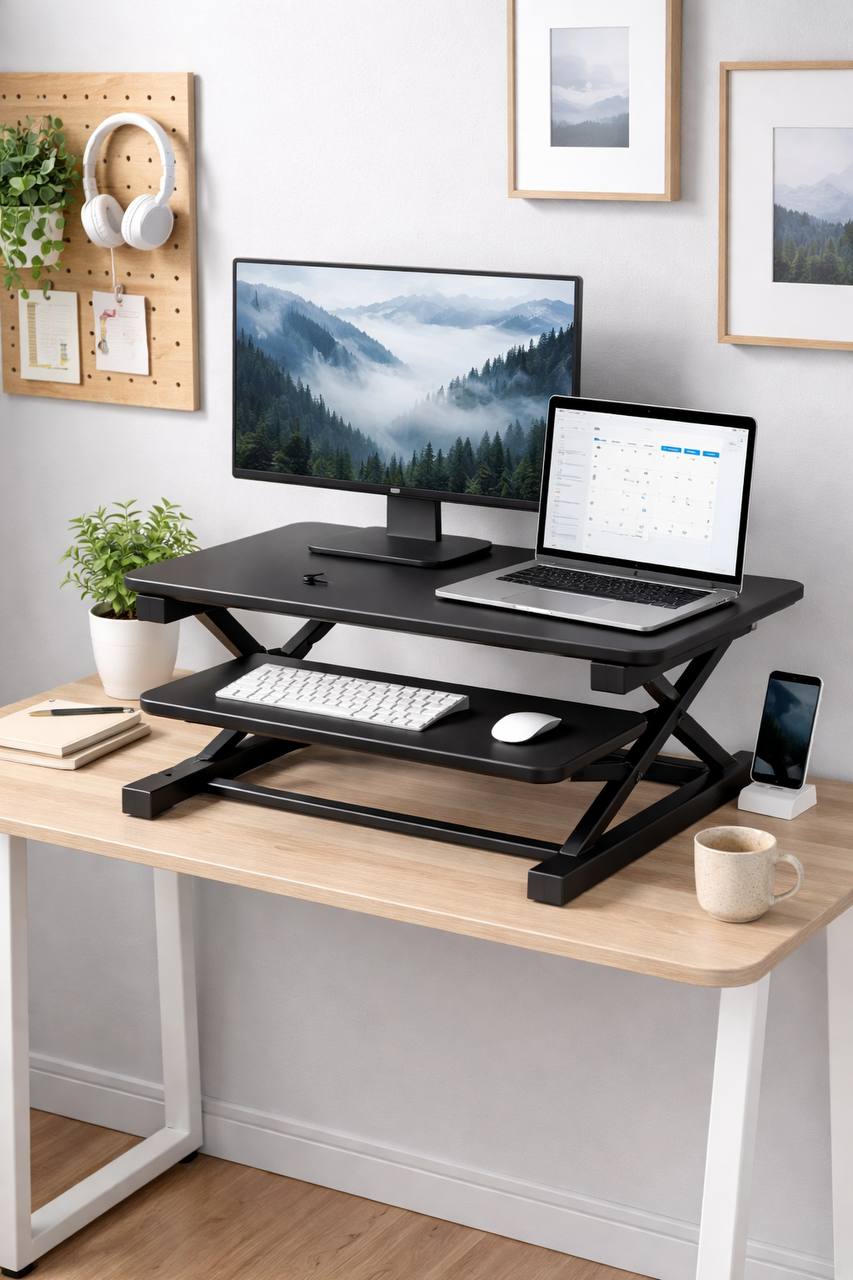
Best standing desk converter for small desks UK: practical category guide for tight spaces
Affiliate disclosure: This guide includes affiliate links. If you buy through them, we may earn a commission at no extra cost to you.
If your desk is small, a standing desk converter can be a smart upgrade. You get sit-stand movement without replacing the whole desk, which matters when space is tight or your room setup is fixed. That is the upside.
The downside is that small desks are unforgiving. A converter that is too deep will shove your keyboard too close to your body. A model that is too narrow will force awkward monitor placement. A frame with poor stability can wobble every time you type at full height.
This guide is built for that exact problem: finding the best standing desk converter for small desks in the UK without guessing. It is a category roundup and buying framework, not a product-name parade. You will see model types, measurements that actually matter, setup steps, and a checklist you can use before checkout.
Inline examples from common UK listings (for example FlexiSpot-style risers, Duronic-style compact units, and other gas-spring platforms sold on Amazon UK) are included only to make the advice concrete. The goal is to help you buy the right type first, then shortlist specific models confidently.
Quick answer: what usually works best on small desks
If you want the short version, most small-desk buyers do best with a converter that has:
- Keyboard surface width around 70–90cm (enough for practical typing and mouse movement).
- Shallow to medium depth so you do not lose all front-edge desk space.
- Stable vertical lift mechanism (gas-spring or well-built scissor frame).
- Realistic weight capacity for your monitor setup, not just a marketing headline.
- Reasonable minimum and maximum height range for your seated and standing posture.
- A clear UK return policy so you can test in your real setup.
For many people using one monitor plus laptop, compact single-tier risers are enough. For dual monitors, you usually need a wider and heavier platform, plus a sturdy base and careful placement.
The most expensive option is not automatically best. On a small desk, fit and stability matter more than feature count.
Category comparison table (small-desk focused)
| Converter category | Best for | Typical width | Typical load | Main strengths | Main trade-off | Common UK price band |
|---|---|---|---|---|---|---|
| Compact single-platform riser | Single monitor + laptop on narrow desks | ~60–75cm | ~8–12kg | Smaller footprint, easier fit, lower cost | Limited keyboard/mouse room | ~£60–£140 |
| Medium-width keyboard-tray converter | Most home-office users | ~75–90cm | ~12–18kg | Better typing ergonomics, balanced footprint | Needs more desk depth than compact types | ~£120–£250 |
| Wide heavy-duty dual-monitor converter | Two monitors + accessories | ~90–105cm | ~15–25kg | Higher stability and workspace | Can dominate a small desk quickly | ~£220–£420 |
| Manual stack riser (fixed-level style) | Occasional standing sessions | ~55–80cm | Varies by design | Cheaper, simple, fewer moving parts | Slow adjustments, weaker workflow switching | ~£35–£110 |
When in doubt, medium-width units are the safest starting point for small desks because they balance fit, comfort, and cost.
Measure first: four numbers that prevent bad buys
Most returns happen because buyers skip measurements. The listing looked fine, but once the converter arrived, keyboard space vanished or monitor depth became unworkable. Take five minutes and record these numbers first.
1) Usable desk width (not total desk width)
Measure the actual clear width where the converter will sit. Ignore areas blocked by lamp bases, speakers, drawers, or side shelving. Many “120cm desks” only have 80–90cm of truly usable central space.
- If clear width is under 70cm, focus on compact categories.
- If clear width is 75–90cm, medium categories are usually possible.
- If clear width is 90cm+, dual-monitor styles become realistic.
2) Usable desk depth from wall to front edge
Depth is where most small desks fail. Many converters need enough rear clearance for lifting geometry plus enough front room for wrists while typing.
- Depth under ~55cm often feels cramped with large tray models.
- Depth around 60–70cm is easier for mainstream converters.
- If your desk is against a wall, check whether the converter shifts backward during lift.
3) Monitor stand depth or monitor arm footprint
Two screens can fit on paper but still fail in real life if the monitor bases eat depth. If you use monitor arms, include clamp position and cable bend space in your measurement.
For dual setups on small desks, monitor arms often free more working room than a bigger converter alone.
4) Seated and standing elbow height range
A converter can “go high” and still be wrong for your body. Check your comfortable seated keyboard height and standing keyboard height. Then compare with the converter’s listed range.
If height range does not match your posture needs, no amount of monitor tweaking will fix discomfort.
Category roundup: what to buy for different small-desk setups
Use these as decision buckets. Pick your bucket first, then shortlist actual models inside that type.
Best for narrow desks and single-monitor work
Choose a compact single-platform or shallow-profile riser. This keeps your desk from feeling crowded while still letting you alternate sitting and standing.
Good fit signals:
- You can place keyboard and mouse without hanging off the edge.
- Lift action feels smooth with your real load.
- Platform stays stable when typing normally.
Watch out for overly small trays marketed as “minimalist”. They look tidy in photos but can be frustrating after a full workday.
Best for small desks with dual monitors
Choose a medium-to-wide converter with stronger frame support, then reduce monitor footprint using compact stands or arms. This is the setup where stability matters most.
- Prefer wider bases and stronger lift columns.
- Check real-world comments for wobble at maximum height.
- Keep total monitor weight below stated limit with headroom, not right at the edge.
If your desk is shallow, a massive dual-monitor converter can become uncomfortable. In that case, a medium converter plus monitor arms is often better than the heaviest platform available.
Best for heavier setups (monitor + laptop + accessories)
Choose heavy-duty designs with clear engineering limits and stronger mechanisms. You pay more, but stability and longevity are usually better.
Look for:
- Higher load rating with trustworthy spec details.
- Rigid frame with low side-to-side sway.
- Consistent lift performance under your full daily load.
Do not max out rated capacity. Staying below the limit improves feel and usually extends mechanism life.
Best budget route for occasional standing
If you stand only in short bursts, simpler manual risers can still help. They are cheaper and less complex, but workflow is slower because adjustments take effort.
This route works if your priority is affordability over quick transitions. If you need frequent posture changes during meetings and focused sessions, gas-assisted models are usually worth the extra spend.
The 8-point buyer checklist before you click buy
- Fit check: converter width is smaller than your real usable desk width.
- Depth check: you will still have comfortable wrist and elbow room at the front edge.
- Height check: min and max range fit both seated and standing posture targets.
- Load check: total monitor and accessory weight is comfortably below the listed max.
- Stability check: reviews mention low wobble during normal typing, not just “easy assembly”.
- Workflow check: lift action is quick enough for how often you switch posture.
- Desk check: your desk itself is sturdy enough for converter + equipment + typing force.
- Risk check: return window and support are clear for UK buyers.
If any of these fail, pause and keep browsing. The wrong converter is annoying every day, not just once.
Pros and cons of standing desk converters on small desks
Pros
- Lower upfront cost than replacing your desk.
- Fast path to sit-stand movement without room redesign.
- Good option for rented homes, temporary setups, and shared rooms.
- Can improve comfort and energy if used with sensible posture changes.
Cons
- Takes some desk surface and can feel bulky on shallow tops.
- Budget models may wobble at full extension.
- Dual-monitor use needs careful weight and footprint planning.
- Not as clean-looking as a full sit-stand desk in many rooms.
None of these are dealbreakers. They are trade-offs. The key is choosing a converter category that matches your desk size and daily work pattern.
20-minute setup plan that actually works
Most comfort complaints come from rushed setup. Use this short routine after delivery.
- Clear the desk so you can test the full lift path without obstruction.
- Center the converter where desk support is strongest.
- Load your real gear (monitor, laptop, keyboard, mouse) before adjusting anything.
- Test seated height first with elbows near 90 degrees and relaxed shoulders.
- Set standing height next so wrists stay neutral and screen top sits around eye level.
- Check wobble with normal typing pressure, not aggressive shaking.
- Route cables with slack so nothing tugs during lift transitions.
- Run 5 sit-stand cycles to confirm smooth movement under load.
- Do a two-hour real work test including typing, calls, and note-taking.
- Fine-tune keyboard and monitor position before deciding to keep or return.
This routine catches most fit issues early, while you are still in the easy return window.
Common mistakes small-desk buyers make (and how to fix them)
Mistake 1: buying by monitor size only
Screen inches do not tell the full story. Stand depth, monitor weight, and desk depth matter just as much.
Fix: calculate full setup footprint, not just panel size.
Mistake 2: trusting maximum load with zero headroom
Running right at the weight limit often leads to weaker lift feel and faster wear.
Fix: keep comfortable margin below maximum capacity.
Mistake 3: ignoring desk stability
A perfectly good converter can still wobble on a flexible desk.
Fix: place near strongest support points and reduce unsupported overhang where possible.
Mistake 4: setting keyboard too high at standing position
This causes shoulder tension fast, especially during long typing sessions.
Fix: lower keyboard surface until shoulders relax and wrists stay neutral.
Mistake 5: expecting all-day standing on day one
Switching too aggressively can create new discomfort even with a good setup.
Fix: use shorter standing blocks and build gradually over one to two weeks.
Converter vs full standing desk: which is better in small UK rooms?
| If your situation is… | Usually better choice | Why |
|---|---|---|
| You already have a decent fixed desk and limited space | Standing desk converter | Lower cost, faster upgrade, no full furniture swap |
| You want a cleaner long-term setup and can replace desk | Full sit-stand desk | Better integrated ergonomics and surface use |
| You move house often or use temporary workspace | Standing desk converter | Portable and easier to keep across room changes |
| You hate desktop bulk and want maximum clean space | Full sit-stand desk | No extra platform layer on top of existing desk |
For many UK home offices, converters are the practical first step. If they solve your comfort and workflow issues, you can postpone a full desk upgrade and spend that budget elsewhere.
FAQ: best standing desk converter for small desks UK
What size standing desk converter is best for a small desk?
For many small desks, 75–90cm width is the sweet spot. It usually gives enough keyboard and mouse room without overwhelming the surface. Go smaller if your desk is very narrow, and wider only if your desk depth and support are strong enough.
Can I use a standing desk converter with dual monitors on a small desk?
Yes, but stability and footprint become critical. Check total weight, desk depth, and wobble feedback from real users. If space is tight, combining a medium converter with monitor arms often feels better than using the widest platform possible.
Do standing desk converters wobble a lot?
Some do, especially cheaper models at full height. Higher-quality mechanisms and stronger desk support reduce wobble significantly. A little movement is normal, but noticeable shake during routine typing is a sign to reconsider.
How much should I spend in the UK for a good small-desk converter?
A practical budget is usually around £120–£250 for balanced quality and comfort. You can spend less for basic use or more for heavier dual-monitor builds, but that middle range often gives the best value for everyday work.
Is a converter better than a full standing desk for renters?
Often yes. Converters are easier to transport, cheaper upfront, and less disruptive in temporary living setups. If you are not ready for a full furniture replacement, converters are a practical way to test sit-stand working first.
How long should I stand each hour when starting out?
Start with short intervals, for example 15–20 minutes each hour, then increase gradually if it feels comfortable. Alternating posture tends to work better than trying to stand continuously for long blocks from day one.
Do I need an anti-fatigue mat with a standing desk converter?
It helps many people, especially on hard floors. It is not mandatory, but a good mat can reduce lower-limb fatigue and make standing sessions easier to maintain.
Final verdict
The best standing desk converter for a small desk in the UK is not one specific model. It is the converter category that matches your real desk measurements, daily load, and work pattern. Get those right and even mid-priced options can perform well for years.
If you want a safe default for most home-office setups, start in the medium-width category, prioritize stability over extras, and test thoroughly within your return window. That approach avoids most expensive mistakes and gives you a setup you will actually use.
Next step: measure your desk today, run the 8-point checklist, and shortlist only converters that pass every item. You will make a better decision in 20 minutes than most people make in two hours of random scrolling.
Leave a Reply