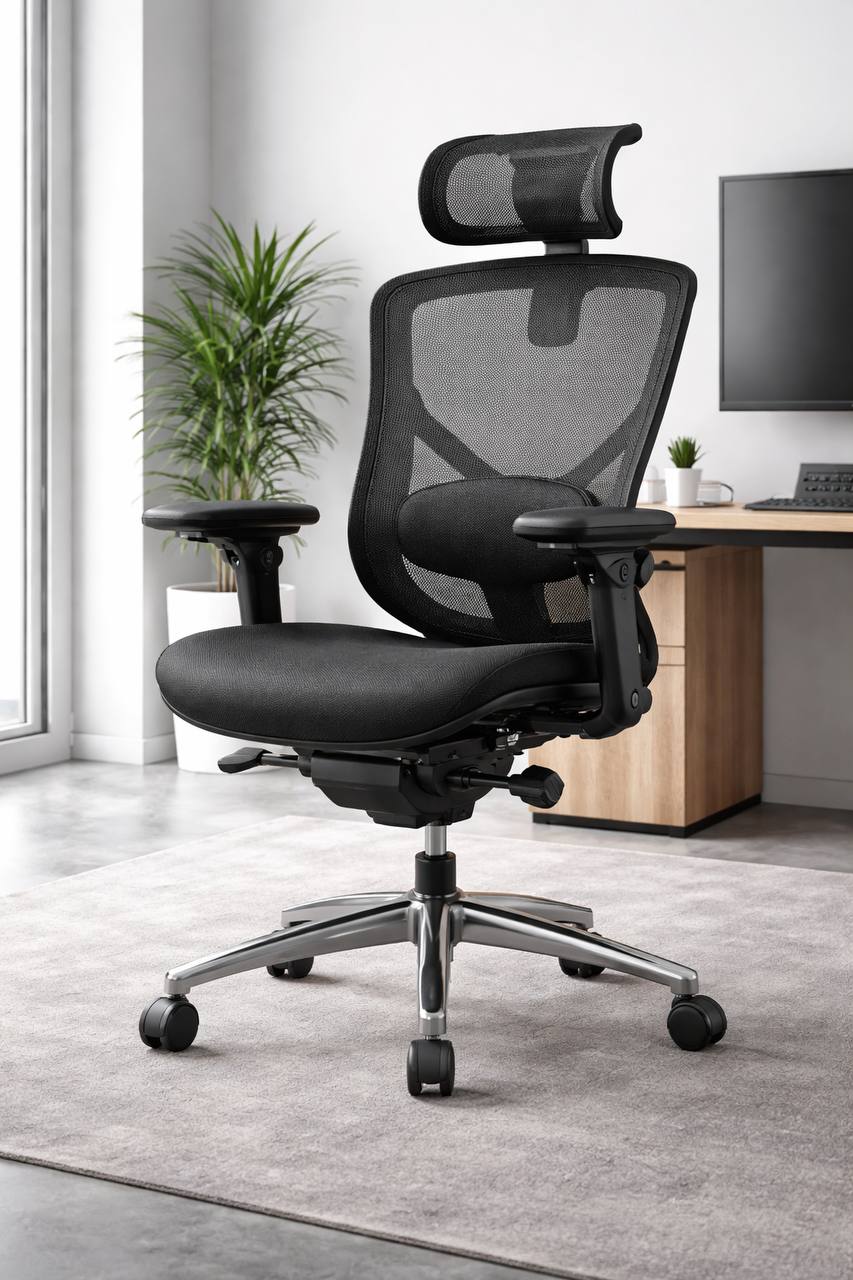
Best ergonomic office chairs for back pain on a budget: practical buying guide
Affiliate disclosure: This guide includes affiliate links. If you buy through them, we may earn a commission at no extra cost to you.
If your lower back is tired by midday, your chair setup is usually the first thing to fix. The problem is that almost every listing now says “ergonomic,” even when the adjustment range is limited.
This is a practical how-to guide and category roundup, not a one-model review. You will see a few common marketplace examples for context, but the focus is on fit, features, and setup techniques that work across brands.
Quick answer: what matters most when money is tight
If you want the short version, prioritize these in order:
- Seat height and seat depth fit your body (not just “adjustable” in the listing).
- Lumbar support you can position so it sits in the right place for your spine.
- Recline tension and lock points so you can change posture without losing support.
- Armrests that move enough to keep shoulders relaxed at keyboard height.
- Clear load rating and return policy so you can test properly at home.
In plain English: adjustability and fit beat fancy branding almost every time.
Category roundup: budget chair types that can reduce back strain
| Chair category | Best for | Main trade-off | Typical budget band |
|---|---|---|---|
| Basic mesh task chair with lumbar knob | Everyday home office use and warm rooms | Cushion comfort can vary a lot between models | ~$100–$190 |
| Mid-range adjustable ergonomic chair | Longer sessions with better fit control | More setup time needed | ~$190–$320 |
| Compact ergonomic chair | Smaller rooms and smaller frames | Can feel narrow for broader shoulders | ~$130–$280 |
| Heavy-duty support chair | Higher load requirements and sturdier base feel | Bulkier footprint and usually heavier | ~$230–$410 |
| Kneeling-style posture seat (secondary option) | Short posture-reset sessions | Usually not ideal as an all-day main chair | ~$90–$230 |
Inline examples you may notice while browsing major marketplaces include SIHOO, Hbada, FLEXISPOT, SONGMICS, and Durrafy listings. Treat those as reference points only. Pick the chair that matches your measurements and work style, not the loudest product page.
The budget rule that saves money: pay for adjustments, not aesthetics
At budget and mid-budget levels, appearance can distract you from what actually helps your back. A clean-looking frame and thick seat foam are nice, but they do not fix poor fit. The features that usually matter most are seat depth range, lumbar movement, recline control, and stable armrest adjustment.
If a listing spends 90% of its page on “executive style” and very little on dimensions, that is usually a sign to keep scrolling.
1) Fit seat height and seat depth first
Most people start with lumbar. That is backwards. If seat height and depth are wrong, your pelvis sits badly, and your lower back has to compensate all day.
- Seat height target: feet flat on the floor, knees roughly level with hips.
- Seat depth target: leave about 2 to 3 finger widths behind your knees.
- Seat pan stability: no obvious front edge pressure on thighs.
Listing snippets often mention “seat depth adjustment,” but not every model has enough range. If exact seat depth numbers are missing, that is a risk for back pain shoppers.
2) Get lumbar contact in the right place, not the hardest place
Good lumbar support feels present but not aggressive. A hard bump can feel supportive for five minutes, then annoying for five hours.
- Look for lumbar movement in height at minimum.
- Depth control is better if you can get it within budget.
- If the support feels too strong, reduce depth before lowering it too far.
Your goal is steady support through the day, not maximum pressure in one upright pose.
3) Use recline as an anti-fatigue tool
Trying to sit perfectly upright all day sounds disciplined, but static posture usually increases discomfort. Controlled recline gives your back small recovery windows during calls, reading, and thinking tasks.
- Check for tilt tension adjustment so recline effort matches your body weight.
- Prefer multiple lock positions over one hard lock.
- If recline details are vague, assume basic performance.
This is one of the most overlooked budget buying checks.
4) Set armrests so your shoulders stop creeping up
Armrests are not optional for many people with back tension. If they are too high, shoulders lift. If too low or too wide, you collapse forward. Both can aggravate the lower back over long sessions.
- Height-adjustable armrests are the baseline.
- Width and pivot adjustment are useful upgrades if available.
- Flip-up arms can help in tight desk spaces.
Quick check: if you shrug while typing, lower the armrests slightly. If wrists drop and shoulders roll forward, raise them a little.
5) Choose materials for long sessions, not showroom feel
Very soft cushions can feel great during a two-minute test and disappointing by late afternoon. For most people with back pain, medium-firm and stable works better than plush.
- Mesh back: helps airflow and keeps upper-back sweat down in warm rooms.
- Seat cushion: denser foam often keeps support longer.
- Frame feel: check for wobble in upright and light recline.
6) Confirm load rating, base stability, and warranty before checkout
Research snippets repeatedly show 120kg to 150kg+ weight ratings in this category. That is useful, but rating alone is not enough. You still need a stable base, a reliable gas lift, and clear support terms.
- Check load rating in written specs, not only in image badges.
- Read recent reviews for wobble, cylinder drift, or creaking.
- Confirm return window and who pays return shipping.
A 15-minute setup routine that usually improves comfort fast
Use this routine on day one. Most people skip this, then blame the chair too early.
- Set seat height so feet are fully planted and thighs are supported.
- Set seat depth until you have a small gap behind your knees.
- Adjust lumbar height to sit in your natural lower-back curve.
- Set recline tension so you can lean back without losing control.
- Set armrests so elbows rest without shrugging.
- Type for 10 minutes, then make one small correction only.
- Re-test after lunch when fatigue usually appears.
One detail that helps: make small changes and keep them for a few hours before changing again. Constant adjustment can hide what is actually working.
Common mistakes that make budget chairs feel worse than they are
- Buying by rating only: good reviews do not mean the chair fits your body.
- Ignoring seat depth: this is one of the biggest back-pain triggers.
- Using max lumbar pressure: more force is not always more support.
- Locking fully upright all day: static posture increases fatigue.
- Skipping desk-height checks: a good chair cannot fully compensate for a bad desk setup.
How to choose by work pattern
If you sit for long focus blocks
Prioritize seat depth control, lumbar consistency, and stable armrests. Tiny fit errors become big problems after 2 to 3 hours of uninterrupted desk time.
If your day is call-heavy
Recline quality matters more. You will move between speaking posture and listening posture all day, so smooth tilt and easy lock points make a real difference.
If your desk space is tight
Look for compact frames and arms that tuck in or flip up. A chair that collides with your desk edge will force awkward posture no matter how ergonomic it sounds on paper.
How to troubleshoot discomfort after week one
If you still have pain after a few days, do not assume the chair is automatically wrong. Sometimes one setting is simply off. This quick troubleshooting pass usually helps you find the real issue.
Lower-back ache appears after 60 to 90 minutes
- Lower seat depth slightly so your pelvis can stay neutral.
- Reduce lumbar pressure one step; too much force can be tiring.
- Use a mild recline during reading or calls instead of staying rigidly upright.
Pressure behind knees or heavy legs
- Seat may be too high or too deep.
- Bring seat height down until thighs are supported without edge pressure.
- If needed, add a footrest so feet stay planted.
Shoulder and upper-back tension grows during typing
- Armrests are often too high or too far apart.
- Lower and narrow them until elbows rest comfortably near your sides.
- Check keyboard and mouse height so wrists are neutral.
Numb feet or frequent fidgeting
- Seat front edge pressure is usually the culprit.
- Reduce seat depth and confirm feet have full contact with floor or footrest.
- Use shorter posture breaks every 30 to 45 minutes.
Your chair cannot fix a bad desk setup
This part is easy to forget. You can buy a decent chair and still feel rough if desk and screen height are off. Think of your setup as one system.
- Desk too high: shoulders rise, neck tightens, lower back stiffens over time.
- Monitor too low: forward-head posture increases upper-back strain.
- Mouse too far away: torso twists slightly all day, which adds fatigue.
A practical fix is to set chair first, then adjust desk inputs around it. If your desk is not height-adjustable, a footrest plus keyboard tray can still make a meaningful difference.
A simple 7-day test plan before return window stress
Do this before deciding to keep or return:
- Day 1: baseline fit using the 15-minute setup routine.
- Day 2: adjust seat depth only; keep all other settings stable.
- Day 3: adjust lumbar height/depth in small steps.
- Day 4: tune recline tension for reading and call posture.
- Day 5: tune armrests with your real keyboard/mouse workflow.
- Day 6: run a full normal workday with no changes and log comfort by time block.
- Day 7: decide keep/return based on consistency, not one good hour.
This process takes a little patience, but it beats buying and returning three chairs in a month.
Budget bands: what you can usually expect
| Budget band | What you usually get | What is often missing |
|---|---|---|
| ~$90–$150 | Basic height adjustment, simple lumbar shape, fixed or flip-up arms | Fine lumbar control, seat slider, durable tilt mechanics |
| ~$150–$255 | Better lumbar tuning, improved mesh backs, stronger base hardware | Full armrest movement on every model |
| ~$255–$385 | Seat depth sliders, better recline tuning, more complete adjustment set | Premium build consistency still varies by listing |
The sweet spot for many back-pain buyers is often in the middle band, where adjustment quality improves without jumping into premium pricing.
If you cannot replace your chair this month
You can still reduce strain while you save. These low-cost fixes are not magical, but they help:
- Add a firm lumbar cushion and place it low, not mid-back.
- Use a footrest if your desk is too high for feet-flat posture.
- Raise monitor height to avoid constant forward head posture.
- Take a 60-second stand-and-reset break every 30 to 45 minutes.
These steps can buy you time and help you make a better chair decision instead of a rushed one.
How to shortlist five strong options in 20 minutes
If you want faster decisions, use this quick shortlist workflow instead of opening 40 tabs and guessing. It keeps you focused on fit and support rather than marketing claims.
- Filter by adjustment set first: seat height, lumbar movement, recline tension, and armrest adjustment are non-negotiable.
- Cut anything with vague dimensions: if seat depth or width is not clearly listed, remove it.
- Check recent durability comments: prioritize feedback mentioning gas lift stability, wobble, and tilt reliability after 3+ months.
- Sort by return quality: keep models with clear return windows and manageable return logistics.
- Compare final five by fit score: choose the model that best matches your body dimensions and desk workflow, not the highest star average.
This is usually enough to identify one practical winner and one backup option.
Quick fit matrix by body size and work style
| Your profile | Prioritize first | Secondary check | Common mistake |
|---|---|---|---|
| Shorter users | Lower minimum seat height and shallower seat depth options | Armrest range so shoulders stay relaxed | Buying deep seats that force forward sitting |
| Taller users | Higher back support and stronger recline frame feel | Seat depth range and load headroom | Ignoring upper-back support quality |
| Long call-heavy days | Smooth recline tension and lock flexibility | Stable arm support for microphone/typing posture shifts | Using fixed-upright posture all day |
| Focused typing-heavy work | Seat depth fit and lumbar placement consistency | Desk/chair height pairing | Over-adjusting lumbar pressure instead of seat fit |
Use this matrix as your final tie-breaker if two chairs look similar on paper.
FAQ
Is a mesh chair always better for back pain?
Not always. Mesh helps airflow, but back comfort depends more on lumbar placement, seat fit, and recline behavior.
Do I need a headrest?
Only if you recline regularly or need upper-back support during calls. For pure typing posture, it is less important than seat and lumbar fit.
Are gaming chairs good for lower-back pain?
Some can work, but many prioritize style over adjustment depth. Always compare seat depth range, lumbar movement, and recline controls before buying.
How long should I test a new chair?
At least 5 to 7 full workdays. Back comfort changes over time, and a chair that feels fine for 20 minutes can fail by day three.
What is the single biggest mistake?
Buying without checking seat depth and return terms. Those two details prevent a lot of expensive trial-and-error.
Final pre-check before you buy
- Seat depth range listed in specs
- Lumbar movement clearly described
- Recline tension and lock details included
- Load rating matches your needs
- Return process and time window confirmed
If a listing passes these checks, you are already ahead of most buyers. That alone can save money and reduce back pain faster than chasing “best seller” labels.
Leave a Reply