Affiliate disclosure: This guide may include affiliate links. If you buy through them, we may earn a commission at no extra cost to you.
If your office lighting feels either dim and sleepy or painfully bright, the issue is usually lumens. Most home setups miss the sweet spot because they rely on one bulb and guesswork.
How many lumens for office lighting?
For most home offices, aim for:
- Ambient room lighting: around 1500 to 3000 total lumens
- Task lighting at desk: roughly 700 to 1200 lumens
- Call light (optional): 300 to 800 lumens, diffused
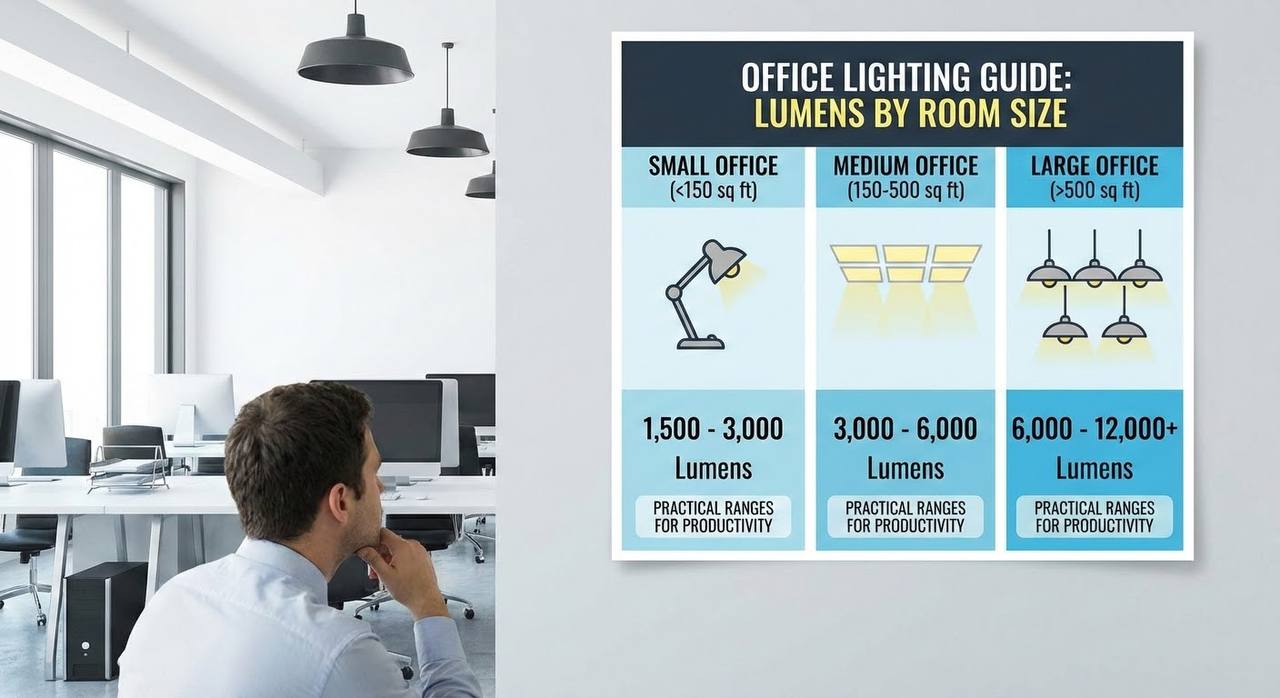
Quick lumens guide by room size
| Room size | Ambient target | Desk task light |
|---|---|---|
| Small office (up to 8 m²) | 1200 to 2200 lumens | 700 to 900 lumens |
| Medium office (8 to 12 m²) | 2000 to 3200 lumens | 800 to 1100 lumens |
| Larger office (12+ m²) | 2800 to 4500 lumens | 900 to 1200 lumens |
These ranges are practical starting points. The right final setting depends on wall color, daylight, and monitor brightness.
How to dial brightness in properly
- Set ambient lighting first so the room is evenly lit.
- Add task light and point it at your work area, not your screen.
- Lower monitor brightness if your desk light is now balanced.
- Adjust dimming until paper and screen both feel comfortable.
Signs your lumens are too high
- You squint at white backgrounds.
- You get reflections on glasses or monitor.
- Your eyes feel dry or tired early in the day.
- Video calls make your face look shiny or blown out.
Signs your lumens are too low
- You lean forward to read notes.
- Shadows on your desk are heavy and distracting.
- Your webcam image looks noisy and flat.
- You feel sleepy faster in the afternoon.
Related guides
- Best Lighting for Home Office: A Practical Setup for Computer Work
- Office Lighting Color Temperature Guide
When in doubt, reduce brightness a little and bring your task lamp closer. Balanced, layered light almost always beats one bright source.
Leave a Reply